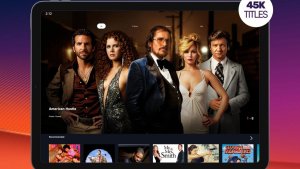
If you want to watch live TV on your mobile phone without paying a monthly fee, the DistroTV It's a free app published on Google Play and available in Brazil. It brings together channels that broadcast 24 hours a day, from news to movies, and doesn't charge a subscription: check the app's listing on the store to see if it's available. contains advertisements And there are no in-app purchases. In other words, instead of a monthly fee, you watch with commercial breaks.
Before downloading, it's worth knowing something that many people only discover later: DistroTV's channel lineup is international. The developer's own description mentions channels from the United States, Canada, the United Kingdom, as well as Spanish-language and South Asian channels. It is not a substitute for Brazilian free-to-air TV.

Advantages of the Application
No subscription required, supported by ads.
There is no paid plan or trial period to unlock channels: the listing on Play states "Contains ads" and does not list any in-app purchases. You open the app, choose a channel, and watch, with commercial breaks interspersed throughout the programming.
Large selection of live channels.
The developer's description on the store mentions over 300 live channels, divided into news, sports, movies, documentaries, music, classic programs, and variety shows. This number is the one stated by the company, and the list may change over time as channels are added and removed.
International content
This is where the app truly shines: it lets you watch news programs and shows from abroad, such as Euronews and Bloomberg, and there are blocks of Spanish-language and Indian channels. If you're studying a language or enjoy foreign programming, this is very useful.
Simple interface
Navigation is straightforward: channels appear in categories and start playing when tapped, with no mandatory card registration or setup steps.
It works beyond just your phone.
According to the store description, DistroTV also runs on Android TV and other streaming devices. The button on this page leads to the download of the Android version on Google Play.
Live and on-demand
In addition to channels that broadcast continuously, part of the catalog is available to watch whenever you want, mainly older movies and series.
What DistroTV doesn't do
This is the point that avoids frustration. The app no It broadcasts Brazilian free-to-air channels but does not provide access to pay-TV channels or Brazilian soccer championships. Most of the programming is in English, and the store does not specify which channels have Portuguese subtitles.
There is also no such thing as a "released," modified, or off-store version: any such file circulating online is not from the developer and puts your device and data at risk. Always download from Google Play.
Other legal ways to watch TV for free
If you're looking for programming in Portuguese, it's worth combining DistroTV with these options, all of which are free and official:
PlutoTV — A free app on the Brazilian Google Play Store that organizes movies, series, and channels in a grid similar to TV. Check the store listing to see if it contains ads.
Official YouTube channels — Broadcasters, newspapers, and clubs maintain free live streams on YouTube itself, without requiring any installation.
Antenna and digital TV If your home device receives a digital signal, free-to-air channels remain the most stable and cost-free way to watch live TV.
Common questions
Yes, there is no subscription. Check the app store listing to see if it contains ads and doesn't list in-app purchases. The cost is for watching with commercial breaks.
The channel lineup is international. The developer mentions channels from the United States, Canada, and the United Kingdom, as well as Spanish-language and South Asian channels. Don't count on Brazilian free-to-air channels being included in the app.
News and economics, sports, movies, documentaries, music, classic programs, celebrities and reality shows, according to the description published by the company on the store.
The store description indicates compatibility with Android TV and other streaming devices, as well as mobile phones and tablets. The button on this page installs the Android version via Google Play.
Live video consumes a lot of data, and the total amount depends on image quality and viewing time. If your data plan is limited, it's best to watch over Wi-Fi.
The store doesn't provide detailed subtitles for each channel. Since a large portion of the programming is in English, the safest option is to open the app and check the options for each broadcast before relying on them.
Yes. The DistroTV page opens normally on the Brazilian Google Play Store, and the app can be installed from here without any region restrictions.
Before deciding, check these points.
- What is truly free?. Free services are usually supported by advertising and have a smaller catalog. Check if what you want to watch is in the free section or behind the subscription price.
- Catalog available in Brazil. The catalog varies by country due to licensing agreements. A title that appears on an international list may simply not exist here.
- Cancellation without a commitment period. Streaming services generally don't have a commitment period, but it's worth checking beforehand — and remembering that access continues until the end of the already paid cycle.
- Compatibility with your TV. Apps often become outdated on older TVs. Before subscribing, confirm that the app exists and is still receiving updates for your model.
What these apps don't do
Every category has a limit, and knowing this one's limit saves time and money by avoiding those who promise more than what's available.
- They don't provide paid content from other services. Any app that promises access to the catalog of various platforms for free is either piracy or a scam.
- Quality depends on your connection: no app delivers 4K on an unstable internet connection.
- Subtitles and dubbing in Portuguese vary by title and are not always included with the release.
- Live content, especially sports, is almost never included in free plans.
How to truly take advantage of it.
- Check the catalog before subscribing. Almost all services let you browse the catalog without an account. Look for three titles you really want to see—if two aren't already there, the plan isn't right for you.
- Download before leaving home. If the service allows downloads, keep the episodes ready on Wi-Fi. The file will be stored in the app and will expire, but it solves the travel problem.
- Start with the free trial. If applicable, mark the day before the end of the period on your calendar. That's when most unwanted charges originate.
- Configure the profile and rating. Separate profiles prevent one person's recommendations from interfering with another's, and age restrictions protect those who use the same account.
Common mistakes that are costly
- Installing apps from outside the store that promise a paid catalog for free — that's piracy and often comes with malware.
- Permanent download enabled: the file expires and can only be reopened with an active subscription.
- Watching on mobile data in high quality and exceeding the data allowance in two days.
- Forgetting about the free trial and being charged for the entire year at once.
Before installing: what's already on the device
Before installing yet another app, it's worth remembering that most TVs and cell phones already come with some free pre-installed services, including movies and free-to-air channels supported by advertising. And streaming from your phone to your TV via Chromecast or AirPlay eliminates the need to install the app on the television.