Losing your cell phone is an immediate worry: along with the device go your photos, conversations, and banking app. The good news is that Android and iPhone come with a free built-in location system, and there are other apps that help with the same task. That's what this article is about: how to locate your cell phone. your own What can you do with your cell phone for free, and what is charged for?.
Before the list, a warning to avoid serious problems: these apps are for locating a device that belongs to you or is under your responsibility. Installing a tracker on someone else's cell phone without their knowledge and authorization is an unauthorized access to a computer system, a crime under Article 154-A of the Penal Code, and none of the options below are designed for that purpose. To monitor a minor child's cell phone, there is the transparent method of parental control, explained later.
Best Apps to Track Your Own Cell Phone
Most of the following options have a free version, but not all: one of them only works with a subscription after the trial period. Therefore, the billing model is written for each item. And always download from the Google Play Store or the App Store on your device, never from an APK file from an unknown website.
Encontre Meu Dispositivo, do Google (gratuito)
O Find My Device (Find My Device) is Google's own free service for Android phones. With it, you can see the approximate location on a map, make the device ring even when it's on silent, remotely lock the screen, and, as a last resort, erase the data. It's the first thing to try when your phone goes missing.
To use it, open the service in any browser and sign in with the same Google account as the lost phone. Two conditions must be met: the device must be turned on and connected to the account, and the feature must have been activated before it was lost, which is a factory-installed feature on most phones. The location shown is an estimate, so treat it as a clue and not an address. Learn more about Find My Device..
Buscar (Find My), da Apple (gratuito)
Those who use iPhones have the Search, Apple's Find My app, which comes pre-installed and is free, locates iPhones, iPads, Macs, and Apple Watches linked to the same Apple ID, shows their approximate location on a map, and allows you to lock the device or remotely erase its contents.
O Search It also has a "Lost Mode," which locks the device and displays a message on the screen with a contact phone number so that whoever finds it can return it. Here too, you need to activate the feature beforehand, in Settings, under your name, in "Find My.". See how Apple's Find My app works..
Prey (plano gratuito limitado)
O Prey It's an anti-theft service that tracks multiple devices under a single account, which is helpful for those who own cell phones, tablets, and laptops. Through the online dashboard, you can request the device's location, block it, and trigger an alarm.
Here comes the part that is usually omitted: the free plan of Prey It is limited in the number of devices and features, and the most complete functions are part of the paid subscription plans. For those who only want to find a lost cell phone occasionally, the free plan is usually sufficient. Search for the app by name in your device's official app store.
Cerberus (pago, com período de teste)
O Cerberus It's one of the best-known anti-theft apps for Android: location tracking, remote locking, alarm, and device location history, all controlled remotely.
But he It's not free.. Cerberus works on a subscription basis: there's a trial period, and then you have to pay to continue using it. In other words, it's only worthwhile if Find My Device, which is free, isn't sufficient for your needs. Download it from Google Play, never as a separate file.
Where’s My Droid (versão gratuita no Android)
O Where's My Droid It's a simple alternative for Android, with a free version on Google Play. It shows the device's location, sends GPS coordinates, and triggers an alarm even when the phone is on silent, solving the classic problem of leaving your phone somewhere in the house.
The app also has a "Commander" feature, for sending remote lock or wipe commands. Before installing, check the app's listing in the store to see what's included in the free version and what requires in-app purchases.
What if it's a minor child's cell phone?
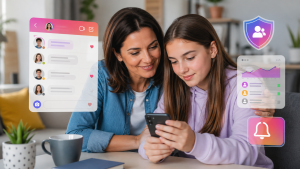
Monitoring a child's or teenager's device is legitimate, as long as it's done transparently: the app is visible on the minor's phone, the system notifies them that supervision is in place, and the family agrees on the rules beforehand. On Android, this process is... Google Family Link, This free app shows the location of the monitored device, sets usage time limits, and allows you to approve downloads. On iPhones, equivalent features are found in Settings, under Family Sharing and Screen Time.
Two points to note. Parental controls are for minors under your guardianship, not for monitoring a boyfriend, spouse, coworker, or adult child. And an app that hides from the phone's owner, promises to read other people's messages, or "clone" WhatsApp is espionage: it's usually removed from app stores, and those who install it can face criminal charges.
What These Apps Do — and What They Don't Do
Besides showing the device on the map, almost all of them lock the screen and remotely erase the data — this is usually the most useful function of all, because if the phone doesn't come back, at least your information won't be with whoever took it. Just remember that erasing the data is irreversible and that, after that, the device usually disappears from tracking.
On the other hand, none of them locate a cell phone by phone number, nor do they find a device that is turned off, without internet, or with the SIM card removed: at most, they show the last recorded location, and always an approximate one. In case of theft, file a police report and leave the recovery to the police, instead of going after the location marked on the map.
Get everything ready before you need it.
- Please check in the settings whether Find My Device (Android) or Find My (iPhone) is enabled.
- Write down the IMEI (dial *#06#) and keep it somewhere else.
- Use screen lock with password or biometrics and automatic photo backup.
- If it goes missing: turn on location services, lock the device, notify your carrier, and file a police report.
FAQ – Frequently Asked Questions
1. Do these apps work on all types of cell phones?
No. Find My Device and Where's My Droid are for Android, Find My is for Apple's system, and Prey supports more than one system. Check compatibility on the app's page in the official store.
2. Is it necessary to pay to use these applications?
It depends on which one. Find My Device and Find My are free and come pre-installed. Prey has a limited free plan, with advanced features available for a fee. Cerberus is a paid subscription after the trial period. Where's My Droid has a free version, and its listing in the app store shows what is charged separately.
3. Can I track my cell phone even if it is turned off?
Generally, no. With the device turned off or without internet, what usually appears is the last known location before it was turned off, and nothing in real time.
4. Do these apps consume a lot of battery?
They may consume more data than regular apps because they use GPS and internet. Services that come pre-installed on the system, such as Find My Device and Search, tend to be the most energy-efficient.
5. Is it possible to locate someone else's cell phone?
Not with these apps, and not without authorization: installing a tracking device on someone's device without their knowledge is a crime in Brazil. What is legal is the voluntary sharing of location data by the individual themselves, and transparent parental controls for minor children.
6. Is it safe to use these apps?
Yes, as long as you use well-known services and only download from Google Play or the App Store. Never install APK files sent via links or message groups: that's how most spyware and "tracking" scams get into your phone.
Conclusion
To find a lost cell phone, you almost always don't need to install anything: Find My Device on Android and Find My on iPhone are free, already installed on the device, and handle the essentials—locating, ringing, locking, and erasing data. Other apps are just backups, so check the price beforehand: Prey has a limited free plan, and Cerberus is a paid subscription.
What makes the biggest difference is preparation: leave tracking enabled, the screen locked with a password, and backups up to date today, while the phone is in your possession. And, if the idea was to monitor a minor child's device, use official parental controls, with the child's knowledge.