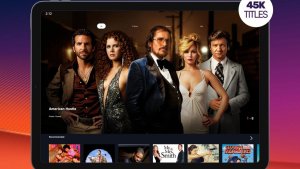
You can watch TV on your phone for free, but it's good to know what's included in that "free" offer: what actually exists are legitimate, ad-supported services with their own channels and catalogs. PlutoTV It's the easiest to start using in Brazil and it's on Google Play. What it doesn't do is stream live broadcast channels like Globo, SBT, Record, or football championships from pay-TV services.
What is Pluto TV?
O PlutoTV It's a free streaming service from Pluto, Inc. It works in two ways: live channels organized by theme, which broadcast continuous programming like traditional TV, and an on-demand section where you choose the movie or episode. There's no monthly fee and no credit card registration is required. The service is paid for with advertising—the listing on Google Play itself displays the warning "Contains ads" and indicates an age rating of 16+.

Advantages of the Application
Live channels separated by theme.
The channel lineup is divided into movie, series, cartoon, documentaries, news, and reality channels. You open the app, choose a channel, and the programming starts playing, without you having to decide what to watch.
Catalog on demand
In addition to live channels, there's an area with movies and episodes to watch whenever you want. This catalog is constantly changing: titles come and go according to licensing agreements, so what's there today might not be there next month.
No subscription and no card required.
The download is free and there is no paid plan to unlock more content. In return, commercial breaks appear during the programs and cannot be skipped.
It starts working right after installation.
The interface is simple and you don't need to create an account to watch. If you do create one, the app saves your favorite channels and the point where you left off.
It runs on more screens than just your phone.
There are versions of Pluto TV for tablets, smart TVs, and streaming devices. Availability varies depending on the brand and year of your device, so it's worth checking the app store for your TV beforehand.
What he doesn't deliver
This is where many people get frustrated. Pluto TV doesn't retransmit live free-to-air channels, it doesn't have football from major championships, and it's not a substitute for a streaming subscription—new movie releases and popular series from paid platforms aren't available. It also requires a constant internet connection: since the content is streamed live, watching via mobile data consumes a significant amount of your data plan.
Other legal ways to watch TV for free
If what you want is free-to-air TV, the way to go is through the broadcaster's own app: Brazilian channels have their own apps with some content available for free, and many maintain official YouTube channels with clips, news, and full programs. Paid streaming services usually offer a free trial period, but remember that the trial becomes an automatic charge if you don't cancel before the deadline.
A word of warning: avoid IPTV apps and APK files that promise "all pay-TV channels for free." They are distributed outside of Google Play, stream content without authorization, and often contain intrusive advertising or malicious code. Always install from your device's official app store.
Common questions
Yes. There are no monthly fees or paid plans within the app: the service is sustained by the ads displayed during programming.
It's not mandatory. You can watch it right after installing. The account is for saving favorites and continuing where you left off on another device.
No. Pluto TV has its own channels and licensed content. For free-to-air channels, use the broadcaster's own app or a digital antenna on your TV.
No. Both live channels and the on-demand catalog are streamed over the network, so you need to be connected to Wi-Fi or mobile data.
Yes. The commercials appear in the middle of the content, similar to broadcast TV, and there is no paid option to remove them.
Criteria that make a difference in the choice
- Catalog available in Brazil. The catalog varies by country due to licensing agreements. A title that appears on an international list may simply not exist here.
- Compatibility with your TV. Apps often become outdated on older TVs. Before subscribing, confirm that the app exists and is still receiving updates for your model.
- Download to watch offline. Not all services allow it, and those that do usually restrict it by title and file validity period.
- What is truly free?. Free services are usually supported by advertising and have a smaller catalog. Check if what you want to watch is in the free section or behind the subscription price.
What these apps don't do
It's important to know what's beyond the reach of this category—that's what avoids frustration and, most importantly, prevents falling for those who promise the impossible.
- Quality depends on your connection: no app delivers 4K on an unstable internet connection.
- Subtitles and dubbing in Portuguese vary by title and are not always included with the release.
- Live content, especially sports, is almost never included in free plans.
- The catalog changes every month because licenses expire. A title available today may be removed without notice.
What to do, in order.
- Configure the profile and rating. Separate profiles prevent one person's recommendations from interfering with another's, and age restrictions protect those who use the same account.
- Start with the free trial. If applicable, mark the day before the end of the period on your calendar. That's when most unwanted charges originate.
- Download before leaving home. If the service allows downloads, keep the episodes ready on Wi-Fi. The file will be stored in the app and will expire, but it solves the travel problem.
- Check the catalog before subscribing. Almost all services let you browse the catalog without an account. Look for three titles you really want to see—if two aren't already there, the plan isn't right for you.
Where most people slip
- Forgetting about the free trial and being charged for the entire year at once.
- Watching on mobile data in high quality and exceeding the data allowance in two days.
- Permanent download enabled: the file expires and can only be reopened with an active subscription.
- Installing apps from outside the store that promise a paid catalog for free — that's piracy and often comes with malware.
What the cell phone itself already does.
Before installing yet another app, it's worth remembering that most TVs and cell phones already come with some free pre-installed services, including movies and free-to-air channels supported by advertising. And streaming from your phone to your TV via Chromecast or AirPlay eliminates the need to install the app on the television.
How does free ad-supported TV pay for itself?
Understanding the model helps predict what the service will and will not offer. The format has a name in the market: free television supported by advertising, organized into channels that run independently, like traditional broadcast television.
The numbers add up for three reasons:
- Linear channel costs less than catalog. Licensing a package of titles for scheduled broadcast is much cheaper than licensing the same titles to be available on demand, at any time.
- The ad is sold per thousand impressions. The more people watching at the same time, the more valuable the commercial break becomes. That's why the service prefers thematic channels that keep viewers hooked for hours over individual titles that are watched only once.
- A deep catalog collection, not a new release collection. Films that have been around for years cost a fraction of what a recent movie costs, and that's what sustains the schedule.
The predictable consequences follow: there are no movie releases, commercial breaks are mandatory and unskippable, and the volume of advertisements increases as the audience grows. None of this is an implementation flaw; it's the model's design.
Why does the channel disappear from the guide?
The schedule for free-to-air channels changes frequently, and the explanation lies in the contract. Each content block enters through a licensing window, with a defined term and territory. When the window ends, the channel is removed or its content changes.
Three practical effects:
- The same service has different pricing structures depending on the country. A channel that exists in another country may simply not exist in Brazil, because the rights were sold to another company here.
- Bypassing this with a VPN violates the terms of service. and it usually results in a blockage. Furthermore, it degrades image quality because the traffic takes a longer route.
- Being a favorite doesn't guarantee you'll stay in the top spot. Marking a channel in the list doesn't prevent it from disappearing; it only helps you find it faster while it still exists.
How much internet data does an hour of streaming consume?
This is the bill that is most missed by those who use limited data plans. The amounts vary by service and codec, but the orders of magnitude are stable:
- Low quality, around 480p: something close to 0.5 GB to 0.7 GB per hour.
- High definition, 720p to 1080p: 1.5 GB to 3 GB per hour.
- 4K: It can exceed 7 GB per hour.
- Audio only., When the service allows the screen to be off: something around 50 MB to 100 MB per hour.
With a 10 GB monthly data plan, that means roughly four hours of high-definition video—and that's it. Two settings significantly change this: fixing the quality instead of leaving it on automatic, and enabling background data restriction for the app, preventing it from consuming data when you're not watching.
It's worth remembering that pre-loading also uses up data. Many apps start downloading the next segment while you're browsing the guide, and some play automatic previews when you're flipping through channels. Turning off automatic preview playback is the most effective adjustment for those who have a lot of megabytes to spare.
Why does it freeze even with an apparently good signal?
Streaming doesn't download the entire video; it requests chunks of a few seconds, one after the other, and measures the speed to decide the quality of the next piece. This is what's called adaptive bitrate.
A buffering issue occurs when the next segment doesn't arrive before the previous one finishes. The most common causes are not related to the contracted speed:
- Instability, not slowness. A 50 Mbps connection with short drops is more prone to interruptions than a stable 10 Mbps connection.
- 2.4 GHz Wi-Fi is congested. In a building, dozens of networks compete for the same space. Switching to the 5 GHz network, when available, solves a good portion of the problem.
- Distance from the router and walls. A full signal indicator on your cell phone does not guarantee sufficient speed.
- Mobile network during peak hours. The tower is shared; the same location offers different speeds at 3 PM and 9 PM.
When it keeps freezing at the same point in the same content, then the problem is usually with the server, not you.
From mobile phone to television: the paths that exist.
Watching on a device is a good start, but almost everyone ends up wanting to play on the big screen. There are four paths, each with different limitations:
- Transmit over network. The phone sends a command and the TV automatically searches for the video on the internet. It's the most stable method because the phone doesn't re-encode anything—you can even use the device for other things while watching. It requires that the TV or dongle supports the protocol and that both are on the same network.
- Mirror your screen. The TV receives a copy of what's on the phone. It works with almost everything, but it consumes a lot of battery, overheats, and suffers from lag. Copyright-protected content often appears as a black screen because copy protection blocks mirroring.
- USB-C to HDMI cable. It only works on devices whose port supports video output, which is far from universal. It's worth checking the model specifications before buying the cable.
- Install the app directly on the TV., Or on a streaming device connected to it. It's the best result, and eliminates the need for a cell phone altogether.
If the goal is to watch in the living room, the fourth option is almost always the right one. The other three are for occasional situations, such as watching at someone's house.
What to expect in terms of image quality
Free services don't usually deliver the same bitrate as paid services, and this shows up in dark, fast-moving scenes: visible blocks in the background, blurry outlines, and sky gradients turning into stripes. It's not your screen; it's compression.
Some adjustments help to disguise this: reduce screen brightness in dark environments, turn off artificial sharpness filters on the television, and avoid stretching the image to fill the screen when the content is old and was produced in a square format. Stretching distorts and worsens the perception of definition.