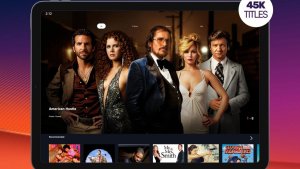
For those looking for a practical way to organize, find, and download movies to watch offline legally, the Google TV It's one of the best options available on the Play Store. The app brings together movies, series, and content from different services in one place, helping users discover where to watch, rent, buy, or access their favorite titles. Furthermore, when content is available in the user's library, it can be downloaded to a mobile phone or tablet for offline viewing.
Advantages of the Application
Download to watch offline
One of the main advantages of Google TV This feature allows you to download purchased or rented movies and episodes to watch later. It's ideal for travel, times without Wi-Fi, or situations where you want to save mobile data. Once the content is saved to your device, the experience becomes more convenient, as the user doesn't need a constant connection to continue watching.
Content gathered in one place.
The app functions as an entertainment hub. Instead of opening multiple apps to search for a movie, the user can use this one. Google TV to find available options on different platforms. This makes choosing much easier, especially for those who subscribe to more than one streaming service and want to quickly know where a particular title is available.
Simple and organized interface.
O Google TV It has a modern, clean, and easy-to-navigate interface. Movies and series appear separated by categories, recommendations, genres, and user preferences. This makes searching faster and helps even those who are not very familiar with technology to find new titles without difficulty.
Personalized recommendations
Another positive aspect is the recommendation system. The app suggests movies, series, and programs based on the user's interests, search history, and connected services. This makes it easier to discover content that matches your taste without wasting a lot of time searching manually.
Personal film library
The app allows access to a library containing content purchased or rented through your Google account. This organization helps users keep their movies in one place, allowing them to access their collection whenever they want. For those who frequently buy or rent movies digitally, this feature makes the experience safer and more centralized.
Safe and legal option
When choosing the Google TV, By using this app, users avoid dubious applications that promise to download movies for free but may pose risks to their phones or violate copyright. The app is official, available on the Play Store, and offers a reliable way to find, buy, rent, and download content compatible with the user's account.
Ideal for travel and everyday life.
Frequent travelers can greatly benefit from the offline feature. Simply download the movie before leaving home and watch it during your commute, at the hotel, or in locations with unreliable internet. It's also useful for those who use public transportation, live in areas with weak signal, or prefer to have content ready to watch whenever they want.
Integration with Google account
Since the app is part of the Google ecosystem, the experience is more integrated. Users can access content related to their account, use the same library on compatible devices, and keep their preferences organized. This brings more convenience to those who already use Google services daily.
Common questions
Yes. The Google TV Allows users to download movies and episodes from their library to watch offline on compatible mobile phones and tablets. This feature is typically available for content purchased or rented according to the platform's rules.
The application Google TV It can be downloaded for free from the Play Store. However, some movies and series may require purchase, rental, or subscription to partner services in order to be watched.
Yes. After downloading a movie or episode allowed by the platform, you can watch it without an internet connection. This feature is very useful for travel, places without Wi-Fi, or times when you want to save mobile data.
The focus of Google TV It organizes content available on different platforms, as well as allowing the purchase and rental of movies. The availability of free movies may vary depending on the region, promotions, connected services, and options displayed in the app.
The app is available for many Android devices through the Play Store, but compatibility may vary depending on the device model, system version, and region. It's best to check directly on the app's page before installing.
Yes. Because it's an official Google app, the Google TV It's a safer option than unknown apps that promise free downloads. It offers a legal and organized way to access movies, series, and content from your library.
It depends on the content. Some films may be available for purchase, rental, or through connected services. Offline downloads are usually related to titles that the user has the right to watch within the platform.
Not necessarily. The Google TV It functions as a hub for finding and organizing content, showing where to watch specific movies and series. In some cases, it directs the user to other compatible streaming services.